> ## Documentation Index
> Fetch the complete documentation index at: https://docs.maestrobots.com/llms.txt
> Use this file to discover all available pages before exploring further.
# Ethereum, BSC & Base
> The Auto Snipe Settings for Ethereum, BSC and Base, including the advanced options and the controls unique to each chain.
The image below shows the Auto Snipe Settings of a random token on Ethereum. BSC and Base will have similar menus minus *Backup TX* and *Block-0 Tip* which are exclusive to Ethereum.
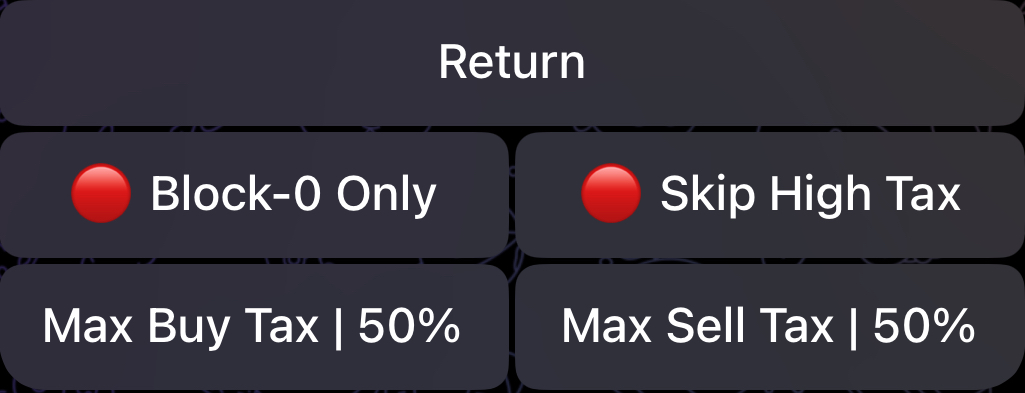
.jpg) Clicking on the ⚙️ *Advanced* button will reveal some additional settings as shown below. The same settings will also exist for BSC and Base with the exception of *Block-0 Only* which is irrelevant for Base.
Clicking on the ⚙️ *Advanced* button will reveal some additional settings as shown below. The same settings will also exist for BSC and Base with the exception of *Block-0 Only* which is irrelevant for Base.
 We will now go over the options provided in Auto Snipe Settings:
### 🕵️♂️ *Simulate -* ⭐️ Premium Exclusive
This ⭐️ Premium feature allows you to simulate contract launches directly through the bot. Our launch simulations will automatically identify **deadblocks**, **launch taxes**, **launch methods**, and the contract's **max buy BEFORE** launch. This feature is mainly informational as Auto Snipe automatically handles all the above when sniping.
As detailed [earlier](/sniper/auto-snipe/auto-snipe-configuration/ethereum-bsc-and-base), the values for *Block-0 Tip*, *Multi Buy*, *Backup TX, Gas Delta, Block-0 Only, Skip High Tax, Buy Tax* and *Sell Tax* will mirror the ones specified in your [Auto Snipe Configuration](/sniper/auto-snipe/auto-snipe-configuration/ethereum-bsc-and-base). However, you have the option to change these values directly in the Auto Snipe Settings of the token.
### Max Buy
This represents the maximum amount (in ETH or BNB) that you're willing to spend for this snipe. The way Auto Snipe uses this value will be detailed below.
### Slippage Mode
There are three possible Slippage modes that you can select for an auto-snipe, and you can only enable one of them:
1. 🟢 | 🔴 Slippage: By default, this will use the *Slippage* set in your [Auto Snipe Configuration](/sniper/auto-snipe/activating-auto-snipe/ethereum-bsc-and-base). Once you enable 🟢 "**Slippage**", the bot will prompt you to insert a slippage value in case you'd like to use a different one.
2. 🟢 | 🔴 Min Token: Select the minimum percentage of supply (example: 1%) or minimum token amount (example: 1k) that you're willing to accept for your auto-snipe. Before triggering your auto-snipe, if Auto Snipe notices that you cannot afford this amount with your "**Max Buy**" then your auto-snipe will be automatically deactivated.
3. 🟢 | 🔴 Max TX Only: If enabled, Auto Snipe will ONLY trigger your auto-snipe if you can afford max TX at the time with your *Max Buy*. If not, then your auto-snipe will be deactivated. This is particularly useful if you're interested in getting max Tx or nothing.
### ✍️ *Pre-Approve*
As mentioned [previously](/sniper/global-settings/approve-settings), in order to sell tokens, you NEED to send a suitable approval transaction beforehand. When *Auto Approve* is enabled in your [*Approve Settings*](/sniper/global-settings/approve-settings), the bot will immediately and automatically send an *Approve* transaction after a successful auto-snipe, which allows you to sell whenever you want to from that point onwards. However, in case you'd like to initiate a sell **immediately** after a snipe, it's best to pre-approve the token before sniping it. All you need to do is click on "✍️ **Pre-Approve**" and the bot will send the *Approve* transaction for this token.
Now that you've configured the Auto Snipe, the last remaining step is to activate the snipe by clicking on the "🔴 **Auto Snipe**" button which will then become "🟢 **Auto Snipe**" as depicted in the image above.
With this set, the bot is now ready to automatically snipe the token as soon as it becomes "tradable", as defined by your configurations.
We will now go over the options provided in Auto Snipe Settings:
### 🕵️♂️ *Simulate -* ⭐️ Premium Exclusive
This ⭐️ Premium feature allows you to simulate contract launches directly through the bot. Our launch simulations will automatically identify **deadblocks**, **launch taxes**, **launch methods**, and the contract's **max buy BEFORE** launch. This feature is mainly informational as Auto Snipe automatically handles all the above when sniping.
As detailed [earlier](/sniper/auto-snipe/auto-snipe-configuration/ethereum-bsc-and-base), the values for *Block-0 Tip*, *Multi Buy*, *Backup TX, Gas Delta, Block-0 Only, Skip High Tax, Buy Tax* and *Sell Tax* will mirror the ones specified in your [Auto Snipe Configuration](/sniper/auto-snipe/auto-snipe-configuration/ethereum-bsc-and-base). However, you have the option to change these values directly in the Auto Snipe Settings of the token.
### Max Buy
This represents the maximum amount (in ETH or BNB) that you're willing to spend for this snipe. The way Auto Snipe uses this value will be detailed below.
### Slippage Mode
There are three possible Slippage modes that you can select for an auto-snipe, and you can only enable one of them:
1. 🟢 | 🔴 Slippage: By default, this will use the *Slippage* set in your [Auto Snipe Configuration](/sniper/auto-snipe/activating-auto-snipe/ethereum-bsc-and-base). Once you enable 🟢 "**Slippage**", the bot will prompt you to insert a slippage value in case you'd like to use a different one.
2. 🟢 | 🔴 Min Token: Select the minimum percentage of supply (example: 1%) or minimum token amount (example: 1k) that you're willing to accept for your auto-snipe. Before triggering your auto-snipe, if Auto Snipe notices that you cannot afford this amount with your "**Max Buy**" then your auto-snipe will be automatically deactivated.
3. 🟢 | 🔴 Max TX Only: If enabled, Auto Snipe will ONLY trigger your auto-snipe if you can afford max TX at the time with your *Max Buy*. If not, then your auto-snipe will be deactivated. This is particularly useful if you're interested in getting max Tx or nothing.
### ✍️ *Pre-Approve*
As mentioned [previously](/sniper/global-settings/approve-settings), in order to sell tokens, you NEED to send a suitable approval transaction beforehand. When *Auto Approve* is enabled in your [*Approve Settings*](/sniper/global-settings/approve-settings), the bot will immediately and automatically send an *Approve* transaction after a successful auto-snipe, which allows you to sell whenever you want to from that point onwards. However, in case you'd like to initiate a sell **immediately** after a snipe, it's best to pre-approve the token before sniping it. All you need to do is click on "✍️ **Pre-Approve**" and the bot will send the *Approve* transaction for this token.
Now that you've configured the Auto Snipe, the last remaining step is to activate the snipe by clicking on the "🔴 **Auto Snipe**" button which will then become "🟢 **Auto Snipe**" as depicted in the image above.
With this set, the bot is now ready to automatically snipe the token as soon as it becomes "tradable", as defined by your configurations.