> ## Documentation Index
> Fetch the complete documentation index at: https://docs.maestrobots.com/llms.txt
> Use this file to discover all available pages before exploring further.
# Approve Settings
> Exclusive to EVM-Compatible Chains
Pressing the ⚙️ *Approve* button reveals the menu shown below:
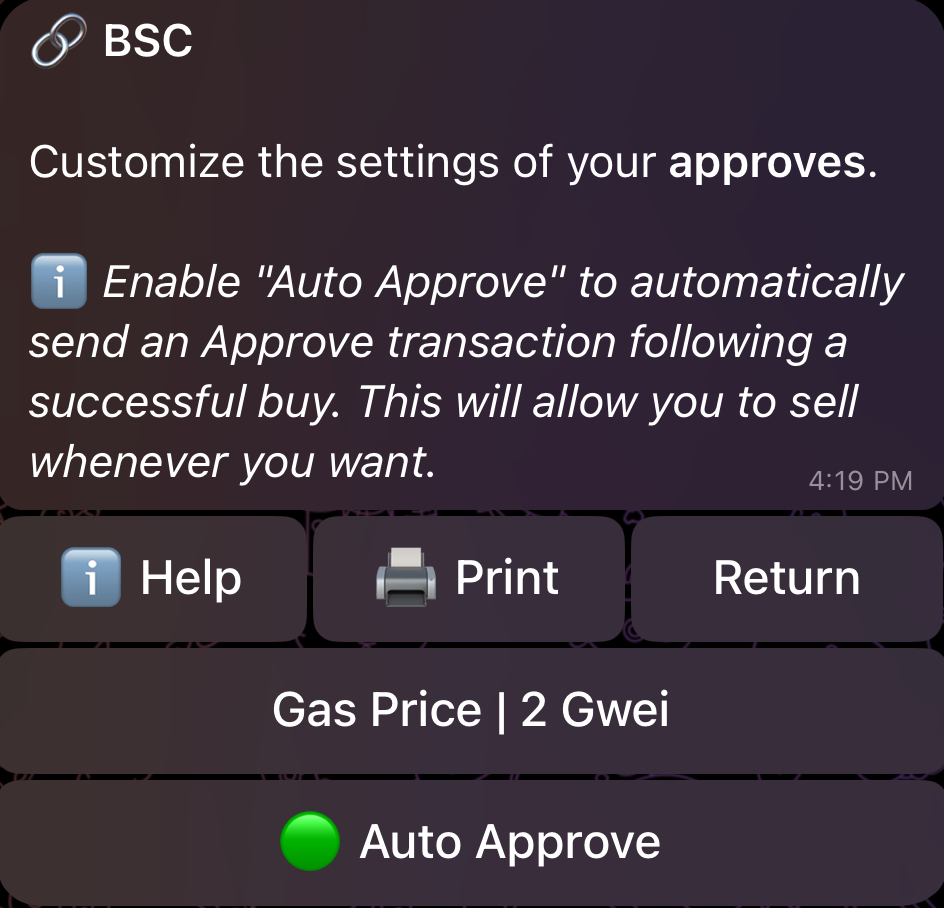 We explain the available options below:
### 🟢 | 🔴 **Auto Approve**
In order to sell tokens, you NEED to send a suitable approval transaction beforehand. When *Auto Approve* is enabled 🟢, the bot will immediately and automatically send an *Approve* transaction after a successful buy, which allows you to sell whenever you want to from that point onwards. If disabled 🔴, you’ll have to *Approve* manually after you buy. Enabling *Auto Approve* makes the bot easier to use overall, and is basically required for people who wish to benefit from *Auto Sell*.
### **Gas Price/Delta**
This allows you to control the transaction priority of your *Approve* on **BSC** with *Gas Price*, and on every other EVM-compatible chain with *Gas Delta*. You don’t need to use high values for this, especially if you have *Auto Approve* enabled.
Some final words on *Global Settings*:
* **You can configure the **\_**Gas Price**\*\*\* (BSC) and \*\****Gas Delta***\*\* (every other EVM-compatible chain) for \*\*\***Buys**, **Sells**, and **Approves**\_ separately.
* **It is important to note that if there are taxes on the token you auto-buy, then you will start with a loss. For example, if the buy tax is 15%, then you will start with a loss of -15% immediately when the buy happens. If your stop loss order is very strict, you might trigger an immediate auto-sell, so be careful.**
* **When using custom slippage on EVM-compatible chains, ensure that your slippage is at least equal to the token's buy tax, otherwise, your transaction will fail. This applies to both manual and automated buys, but does not hold for auto-snipes where your slippage can be lower than that of the token's buy tax.**
* **These settings are global and affect the behavior of Signals and Copytrade, but you can override them by adjusting the settings in the dedicated** [**Signals**](/sniper/signals) **and** [**Copytrade**](/sniper/copytrade) **settings pages.**
We explain the available options below:
### 🟢 | 🔴 **Auto Approve**
In order to sell tokens, you NEED to send a suitable approval transaction beforehand. When *Auto Approve* is enabled 🟢, the bot will immediately and automatically send an *Approve* transaction after a successful buy, which allows you to sell whenever you want to from that point onwards. If disabled 🔴, you’ll have to *Approve* manually after you buy. Enabling *Auto Approve* makes the bot easier to use overall, and is basically required for people who wish to benefit from *Auto Sell*.
### **Gas Price/Delta**
This allows you to control the transaction priority of your *Approve* on **BSC** with *Gas Price*, and on every other EVM-compatible chain with *Gas Delta*. You don’t need to use high values for this, especially if you have *Auto Approve* enabled.
Some final words on *Global Settings*:
* **You can configure the **\_**Gas Price**\*\*\* (BSC) and \*\****Gas Delta***\*\* (every other EVM-compatible chain) for \*\*\***Buys**, **Sells**, and **Approves**\_ separately.
* **It is important to note that if there are taxes on the token you auto-buy, then you will start with a loss. For example, if the buy tax is 15%, then you will start with a loss of -15% immediately when the buy happens. If your stop loss order is very strict, you might trigger an immediate auto-sell, so be careful.**
* **When using custom slippage on EVM-compatible chains, ensure that your slippage is at least equal to the token's buy tax, otherwise, your transaction will fail. This applies to both manual and automated buys, but does not hold for auto-snipes where your slippage can be lower than that of the token's buy tax.**
* **These settings are global and affect the behavior of Signals and Copytrade, but you can override them by adjusting the settings in the dedicated** [**Signals**](/sniper/signals) **and** [**Copytrade**](/sniper/copytrade) **settings pages.**