> ## Documentation Index
> Fetch the complete documentation index at: https://docs.maestrobots.com/llms.txt
> Use this file to discover all available pages before exploring further.
# Auto Buy on Pasted Contract
> Set up the Maestro DMs signal to auto-buy any contract you paste into the bot, with your own buy amount, checks, gas and sell limits, for fast stealth-launch snipes.
Suppose that you want to snipe a stealth launch of a hyped token. In such situations, speed is key, especially when hundreds of buyers are racing to copy-paste the new contract address into Pancakeswap/Uniswap, or in our case, the bot trading terminal. To give you an edge over your competition, we introduced the `Maestro DMs` signal, which allows you to setup auto-buys for pasted contract addresses. Follow these steps to set it up:
* From the `/start` menu, go to *Signals.* This will open the following menu:
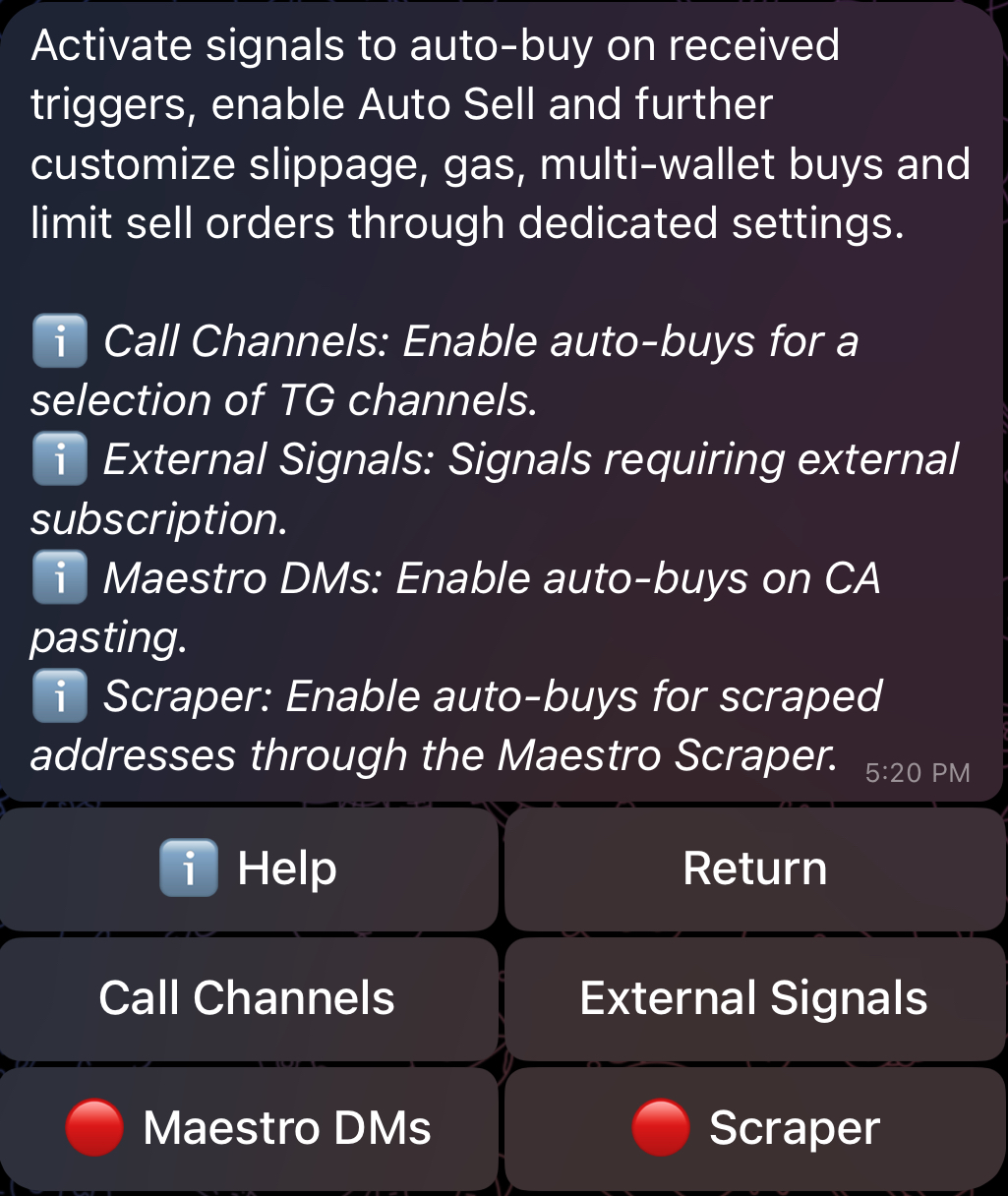 * Select the `Maestro DMs` signal. This will open the settings menu shown below. This menu behaves exactly like other Signals settings (Call Channels, External Signals and Scraper). We delve deeper into these settings in Section [5](/sniper/signals).
.jpg) * Select a suitable *Buy Amount* and click on "**Inactive**" to activate the channel as shown in the image above. As discussed earlier, automated buys will not trigger unless "**Allow Auto Buy**" is enabled in your [*Global Buy Settings*](/sniper/global-settings/buy-settings#or-allow-auto-buy). The bot will warn you if this is not the case once you activate a signal.
* *Auto Buy Checks* can be used to set optional checks and limits such as Min/*Max MC*, *Min/Max Liquidity* and *Max Buy/Sell Tax.* If any of these limits is not met, *Auto Buy* won't trigger for the pasted contract. Initially, *Auto Buy Checks* will inherit the same values that you've set in your [*Global Buy Settings*](/sniper/global-settings/buy-settings#or-allow-auto-buy), but you can further customize and/or disable these checks directly from your `Maestro DMs` settings. **In such cases, the values specified in the `Maestro DMs` settings will take priority over the ones specified in your** [***Global Buy Settings***](/sniper/global-settings/buy-settings#or-allow-auto-buy)***.***
* *Slippage*, *Smart Slippage*, *Gas Delta/Price* and *Degen Mode* will initially mirror what you have in your [*Global Buy Settings*](/sniper/global-settings/buy-settings) and your [*Global General Settings*](/sniper/global-settings/general-settings), and **they only impact auto-buys on pasted contracts**. You can also customize them directly in the `Maestro DMs` signal.
* *Multi Buy* can be used to select the wallets that will participate in any auto-buy triggered by the `Maestro DMs` signal (pasted contracts) as shown in the image below. Initially, *Multi Buy* is defaulted to your "[Default](/sniper/wallet-setup#manual-and-default-wallet)" wallet, but you can further customize this to set any selection of wallet.
* Select a suitable *Buy Amount* and click on "**Inactive**" to activate the channel as shown in the image above. As discussed earlier, automated buys will not trigger unless "**Allow Auto Buy**" is enabled in your [*Global Buy Settings*](/sniper/global-settings/buy-settings#or-allow-auto-buy). The bot will warn you if this is not the case once you activate a signal.
* *Auto Buy Checks* can be used to set optional checks and limits such as Min/*Max MC*, *Min/Max Liquidity* and *Max Buy/Sell Tax.* If any of these limits is not met, *Auto Buy* won't trigger for the pasted contract. Initially, *Auto Buy Checks* will inherit the same values that you've set in your [*Global Buy Settings*](/sniper/global-settings/buy-settings#or-allow-auto-buy), but you can further customize and/or disable these checks directly from your `Maestro DMs` settings. **In such cases, the values specified in the `Maestro DMs` settings will take priority over the ones specified in your** [***Global Buy Settings***](/sniper/global-settings/buy-settings#or-allow-auto-buy)***.***
* *Slippage*, *Smart Slippage*, *Gas Delta/Price* and *Degen Mode* will initially mirror what you have in your [*Global Buy Settings*](/sniper/global-settings/buy-settings) and your [*Global General Settings*](/sniper/global-settings/general-settings), and **they only impact auto-buys on pasted contracts**. You can also customize them directly in the `Maestro DMs` signal.
* *Multi Buy* can be used to select the wallets that will participate in any auto-buy triggered by the `Maestro DMs` signal (pasted contracts) as shown in the image below. Initially, *Multi Buy* is defaulted to your "[Default](/sniper/wallet-setup#manual-and-default-wallet)" wallet, but you can further customize this to set any selection of wallet.
.jpg) * If *Auto Sell* is enabled 🟢, the bot will automatically create the sell limit orders defined in "**⚙️ Sell Limit**" following every **automated buy triggered by the** `Maestro DMs` **signal.** If *Auto Sell* is disabled 🔴, no sell limit orders will be automatically added following an automated buy triggered by this signal, even if you have them defined in "**⚙️ Sell Limits**". Initially, "**⚙️ Sell Limits**" will inherit the same limits defined in your [*Global Sell Settings*](/sniper/global-settings/sell-settings#sell-limits-presets), but you can further customize these limits directly from your `Maestro DMs` settings. **In such cases, the sell limits specified in the `Maestro DMs` settings will take priority over the ones specified in your** [***Global Sell Settings***](/sniper/global-settings/sell-settings#sell-limits-presets)***.***
Now, when you paste a contract address into the bot, it will check whether the token satisfies the marketcap, liquidity, and tax conditions specified for the `Maestro DMs` signal, and then attempt to auto-buy the token with the amount specified in *Buy Amount,* and using the slippage and gas settings specified in the signal.
**You DO NOT need to worry about your auto-buy amounts exceeding the max transaction limit. If your **\_**Buy Amount is higher than the limit and the bot manages to estimate that limit, then the bot will automatically adjust the Buy Amount**\_\*\* to make sure the transaction goes through.\*\*
If you don’t want the bot to auto-buy pasted contract addresses, make sure that *the* `Maestro DMs` signal is inactive 🔴. You can also control this using the shortcut `/quick` , which gives you an easily accessible menu of useful settings for all [enabled](/sniper/getting-started#enabling-disabling-chains) chains. Alternatively, you can append a particular chain to the command to access the quick settings for a particular chain. For example, `/quick_eth` and `/quick_sol` can be used to access the quick settings of Ethereum and Solana, respectively.
* If *Auto Sell* is enabled 🟢, the bot will automatically create the sell limit orders defined in "**⚙️ Sell Limit**" following every **automated buy triggered by the** `Maestro DMs` **signal.** If *Auto Sell* is disabled 🔴, no sell limit orders will be automatically added following an automated buy triggered by this signal, even if you have them defined in "**⚙️ Sell Limits**". Initially, "**⚙️ Sell Limits**" will inherit the same limits defined in your [*Global Sell Settings*](/sniper/global-settings/sell-settings#sell-limits-presets), but you can further customize these limits directly from your `Maestro DMs` settings. **In such cases, the sell limits specified in the `Maestro DMs` settings will take priority over the ones specified in your** [***Global Sell Settings***](/sniper/global-settings/sell-settings#sell-limits-presets)***.***
Now, when you paste a contract address into the bot, it will check whether the token satisfies the marketcap, liquidity, and tax conditions specified for the `Maestro DMs` signal, and then attempt to auto-buy the token with the amount specified in *Buy Amount,* and using the slippage and gas settings specified in the signal.
**You DO NOT need to worry about your auto-buy amounts exceeding the max transaction limit. If your **\_**Buy Amount is higher than the limit and the bot manages to estimate that limit, then the bot will automatically adjust the Buy Amount**\_\*\* to make sure the transaction goes through.\*\*
If you don’t want the bot to auto-buy pasted contract addresses, make sure that *the* `Maestro DMs` signal is inactive 🔴. You can also control this using the shortcut `/quick` , which gives you an easily accessible menu of useful settings for all [enabled](/sniper/getting-started#enabling-disabling-chains) chains. Alternatively, you can append a particular chain to the command to access the quick settings for a particular chain. For example, `/quick_eth` and `/quick_sol` can be used to access the quick settings of Ethereum and Solana, respectively.